How to type without looking at the keyboard
Looking at the keyboard isn't the problem — it's the symptom of one. If your eyes have to flick down to find a key, your fingers don't know where it is. The fix isn't "stop looking." The fix is to teach your fingers the keyboard well enough that looking down stops feeling useful.
The premise: it's a finger-placement problem
Touch typing is the simple idea that specific fingers play specific keys, and your hands stay anchored to a known starting position (the home row) between keystrokes. Once those two habits are automatic, your fingers can locate any key by feel — no eyes needed. People who can't type without looking aren't worse with computers; they just never installed those two habits.
The instinct most self-taught typists develop is a hybrid: a few fingers do most of the work, eyes confirm the position every few keystrokes. It feels fast enough. It tops out at about 35 WPM with a noticeable amount of staring at the keyboard and a real upper limit on accuracy, especially for symbols and numbers.
Finger zones: which finger plays which key
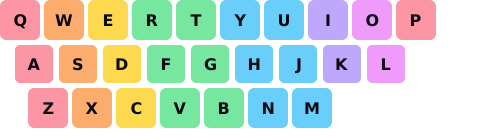
The mapping isn't arbitrary — it minimizes finger travel and lets adjacent fingers cover adjacent columns. Brief tour:
- Left pinky: Q, A, Z (plus Tab, Caps Lock, Shift).
- Left ring: W, S, X.
- Left middle: E, D, C.
- Left index: R, T, F, G, V, B — covers two columns, since the index finger is the strongest.
- Thumbs: the space bar. Whichever feels natural; right thumb is more common.
- Right index: Y, U, H, J, N, M.
- Right middle: I, K and the comma.
- Right ring: O, L and the period.
- Right pinky: P, semicolon, slash (and Enter, Shift).
Why the home row matters
The home row — A S D F on the left, J K L ; on the right
— is your anchor. Most keyboards have a small bump on F and
J so your index fingers can find them without looking. Your fingers
rest there between keystrokes and return there after reaching for any other key.
This is the single mechanic that lets you type without looking: your fingers always know where they are, because they always start from the same place. Without a home- row anchor, your hands drift, and your fingers stop being able to predict where the next key is. With one, every keystroke is a known displacement from a known origin.
The three things you actually have to drill
- Finger-to-key assignment. Until your left pinky automatically hits Q without your brain consulting a map, you don't have touch typing yet. Drill the assignments until they're reflexes.
- Returning to the home row. Every reach should snap back. The first week of practice, your fingers will want to stay wherever they last landed. Force them home until the snap-back is automatic.
- Not looking, even when you want to. If you can see the keyboard, you'll peek. Cover it with a cloth, look at the screen, or use a tool that hides the keyboard from you. The discomfort of not looking is the practice.
The 21-day plan
Three weeks of focused practice is enough for most people to switch from hunt-and- peck to genuinely-not-looking. Not enough for elite speed — that takes months — but enough that you'll stop staring at the keyboard.
Days 1–7: home row only
Practice typing only home-row letters. Use random combinations of asdf jkl;
sda fjk lda saj. Two 10-minute sessions a day. The goal isn't speed; it's
finger placement. Each finger should hit its key without any of the others moving.
Look at the screen, not the keyboard. If you can't help it, drape a tea towel
over your hands.
Days 8–14: add top and bottom rows
Now bring in the top row (Q W E R T Y U I O P) and bottom row (Z X C V B N M).
The discipline is the same: each finger reaches up or down to its assigned key,
then snaps back to the home row. Real words start appearing — type short ones at
first (the, and, but, for) and
build up. Your speed will be terrible. That's fine.
Days 15–21: prose at any speed
Switch to actual prose — a news article, a book paragraph, anything you didn't write yourself. Aim for 99% accuracy at whatever speed your fingers can deliver. Speed will start climbing on its own. By day 21, most people are around 30 WPM and no longer looking down.
Common mistakes that slow people down
- Peeking when you hit a "hard" key. Resist. Your fingers learn faster from a wrong keystroke than from a peek; the wrong keystroke teaches them where the key actually is.
- Using two fingers for one key. Hybrid hunt-and-peck habits sneak back in. If your right index is supposed to play
Hbut your left finger does it instead, your muscle memory never converges. One finger, one key. - Hands floating off the home row. Especially after long stretches of letters in one half of the keyboard. Force the snap-back; it gets automatic in days.
- Wrist position. Wrists should hover, not rest on the keyboard. Resting wrists make your fingers reach by twisting instead of moving — that's a long-term injury path.
- Practicing too fast. Speed is a side effect of accuracy. If you push speed before your fingers know the layout, you cement bad habits — and you'll have to unlearn them later.
How you'll know it's working
The clearest sign isn't that you're suddenly fast — it's that you've stopped checking. Watch for the moment when you type a sentence on autopilot while thinking about what you want to say next. That's the muscle memory taking over. Speed follows automatically over the next few months.
Some honest expectations:
- Days 1–7: Slower than your old hunt-and-peck. Mildly frustrating.
- Days 8–14: Comparable to old speed, with way fewer peeks. Mildly rewarding.
- Days 15–21: Slightly faster than old speed, looking at the screen ~100% of the time.
- Months 2–3: 50+ WPM with normal practice. The peeks are completely gone.
- Months 4–6: 70+ WPM for most adults who keep practicing.
How typer fits
typer is built for exactly this curve. The progressive unlock starts with two home-row letters, gates the next letter on hitting your target speed, and won't show you a key until your fingers know the previous ones. It's effectively the 21-day plan above, automated. The keyboard view in the app shows finger zones live (the same colors as the diagram above), which is useful for the first week or two when you're still building the assignments.
One concrete plan: 10 minutes of home-row drills morning and evening for the first week. Then start a typer session and let the unlock system carry you from week 2 onward. Twenty-one days isn't long. The dividend (every keystroke for the rest of your career, with no peeking) is.