Keyboard layouts compared: QWERTY, Dvorak, Colemak, Workman
The "best" keyboard layout question gets asked a lot and answered badly. The honest answer: for most people, the layout you already know is the right one. But there are real tradeoffs worth understanding before you spend three weeks remapping your muscle memory.
The short version
| Layout | Designed for | Switch worth it? |
|---|---|---|
| QWERTY | Mechanical typewriters | Default. Stay unless you have a specific reason. |
| Dvorak | English-language efficiency | Niche. Big behaviour change for modest payoff. |
| Colemak | Easier QWERTY migration | The realistic upgrade if you want one. |
| Workman | Reducing lateral finger reach | Niche-of-a-niche. Strong claims, small audience. |
QWERTY: the default that won
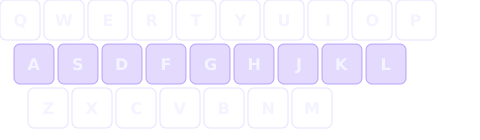
QWERTY was designed in the 1870s for mechanical typewriters. The popular story is that the layout was deliberately slow to keep adjacent type-bars from jamming. Modern researchers think that's only partly true — frequently-paired letters were separated, but "slowing typists down" was less the goal than "avoiding jams." Either way, QWERTY locked in with the typewriter industry and has been the default for English typing ever since.
Common knock against QWERTY: only ~32% of keystrokes happen on the home row when typing English. Common knock against the knock: most people type fast enough on QWERTY that the home-row stat doesn't actually predict real-world WPM.
Stay on QWERTY if: you already type 50+ WPM, share machines with others, use OS shortcuts heavily, or do anything where the loss of three weeks of speed during transition would hurt.
Dvorak: the early optimization play
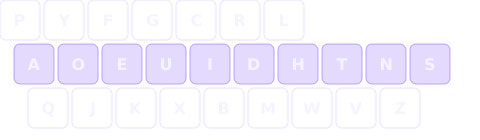
August Dvorak filed his layout in 1936. The goals were unambiguous: maximize home-row use, alternate hands between keystrokes, and put common letters under strong fingers. About 70% of keystrokes land on the home row in standard English — more than double QWERTY.
The catch: research has consistently failed to find a large speed advantage over QWERTY for trained typists. The 1956 GSA study that's often cited as proof of Dvorak's superiority had methodological problems, and follow-up studies have shown modest at best gains (typically <5%). The bigger genuine wins for Dvorak users tend to be reduced finger fatigue and lower lateral motion — useful if you type 6+ hours a day and feel it.
Try Dvorak if: you have RSI concerns, you type for many hours daily, or you're learning to type for the first time and don't have existing QWERTY muscle memory to overcome.
Colemak: the pragmatic upgrade
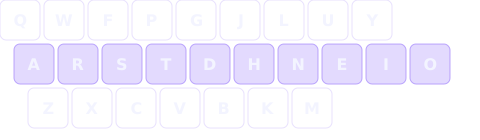
Colemak was designed by Shai Coleman in 2006 specifically as a "switch-friendly" alternative — it keeps 17 of QWERTY's letter positions (including most common shortcut keys: Z, X, C, V) but moves the most frequent letters to the home row. About 74% of English keystrokes hit the home row.
In practice, Colemak users report shorter relearning times than Dvorak (because
fewer keys move) and end up with comparable home-row efficiency. The Colemak-DH
variant — which moves D and H to reduce lateral
reaching — has become the de facto modern recommendation.
Try Colemak if: you're sold on the alt-layout idea but don't want to lose every familiar shortcut. It's the most popular choice among developers and writers who actually switch.
Workman: the ergonomic compromise
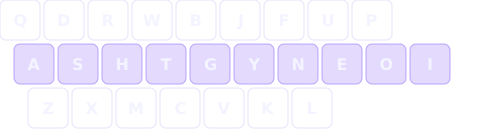
Workman, designed by OJ Bucao in 2010, prioritizes minimizing lateral finger stretches. The argument: home-row percentage isn't everything — moving your index finger sideways to hit a key on the wrong column is more uncomfortable than moving the same finger to the top or bottom row of its own column.
Workman has the smallest user base of the four and the least independent validation. If you're already deep in alt-layout discussions and find Colemak doesn't feel right, it's worth experimenting with. Otherwise, Colemak-DH addresses similar concerns with more community support.
What the research actually says about speed
The honest summary, after a few decades of studies:
- Trained typists on alternative layouts (Dvorak/Colemak) reach about the same top WPM as trained QWERTY typists. Small absolute differences, not factors-of-two.
- Comfort and fatigue improvements are more consistently reported than speed improvements. If you have hand pain or type many hours, this matters.
- The biggest determinant of speed is practice volume on whatever layout you're using — far more than which layout it is.
- The "switching cost" is real: 2–6 weeks of reduced speed during transition, and another 2–3 months before you're fully back to your previous WPM.
How to switch layouts (if you decide to)
- Pick a switching strategy. Either go cold-turkey (faster recovery, painful first week) or use a layout switcher and toggle (slower recovery, fewer productivity hits).
- Change the OS-level layout, not your keycaps. Looking at QWERTY-printed keys while typing Colemak forces you to learn touch typing without cheating — which is the point.
- Block out 2–4 weeks of reduced typing speed. Don't switch the week before a major deadline.
- Practice with code, not just prose. Common programming symbols don't move between layouts, but their positions relative to moved letters do, which can throw off muscle memory.
How to learn a new layout with typer
typer is built around progressive letter unlocking, which happens to be exactly how you want to learn a new layout — one letter at a time, gated on hitting target speed before the next one joins. A layout-picker option is on the roadmap; for now the app is tuned for QWERTY, but the progressive-unlock approach generalizes cleanly once it ships.
Concrete advice: if you're a developer typing 50+ WPM on QWERTY without pain, the expected return from switching is small. If you're below 40 WPM, or feel real fatigue/discomfort, Colemak-DH is the most evidence- supported alternative. Either way, the time you'd spend switching is probably better spent practicing what you have.
FAQ-style quick answers
Is QWERTY actually inefficient?
Inefficient compared to what's possible, yes. Inefficient enough that switching pays off for the average user, no. Trained QWERTY typists are competitive with trained Dvorak/Colemak typists at the top end.
What about non-English typing?
Dvorak and Colemak optimize for English letter frequencies. For Spanish, French, German, or other languages with different frequency profiles, the home-row gains are smaller. Language-specific layouts (AZERTY for French, QWERTZ for German, Bépo for French Dvorak-style) target this directly.
Does layout matter for programmers specifically?
Less than you'd think — code is symbol-heavy and the symbols don't move between Latin-based layouts. Letter rearrangement matters mostly for variable names and comments. See typing exercises for programmers for what to actually drill if your code WPM feels slow.
Open typer →